How to block or unblock a member
Learn how user blocking works and what happens after a member is blocked in the company workspace
Go to Company → Members.
On the member’s row, open the row menu.
Choose Block or Unblock.
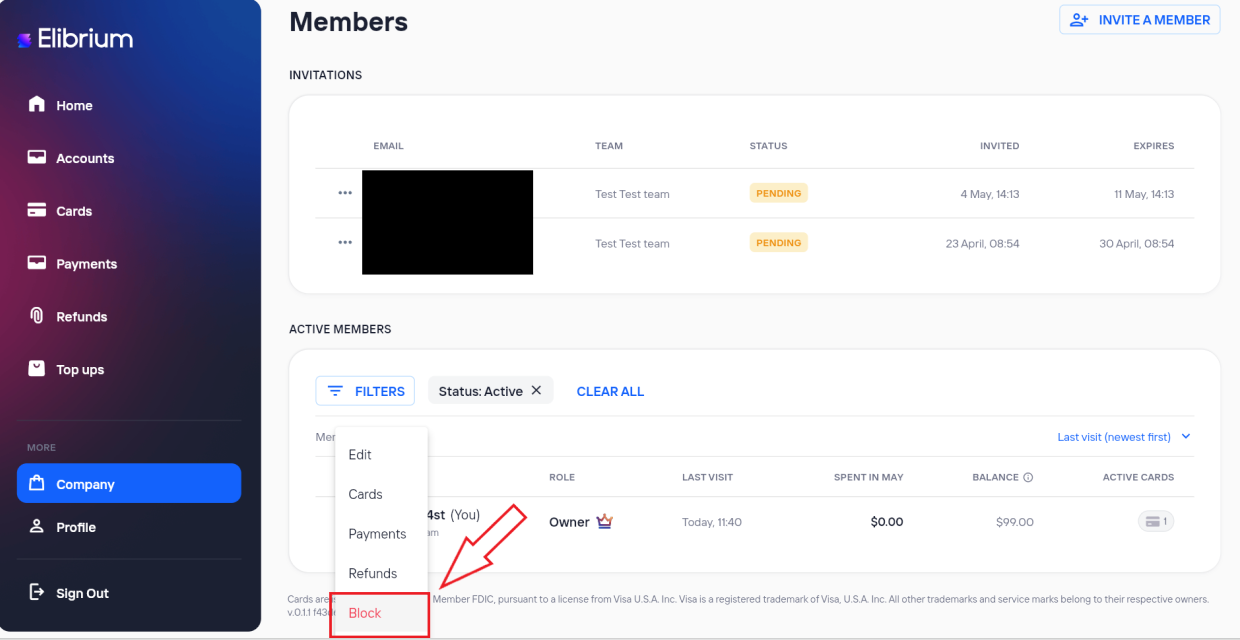
Confirm the action.
What happens after blocking a member
After a member is blocked:
access to the application and API is restricted ( уточнить может залогиниться или нет)
the user can no longer work with cards, payments, accounts, or company sections;
active sessions become unavailable after the next request.
Blocked users see “Your account has been blocked. Please contact your manager or support.”
Important note:
cards and operations are not deleted after blocking;
blocked members remain visible in the members list with Blocked status;
Owner or Admin users can restore access using Unblock.